
Real-Time Auditing in Your Viewport.
Meet the developer sidekick that flags WCAG errors visually as you code. Zero config required-simply install from the Chrome Web Store to segment layouts, verify keyboard focus routes, and inspect instant framework remediation patches.
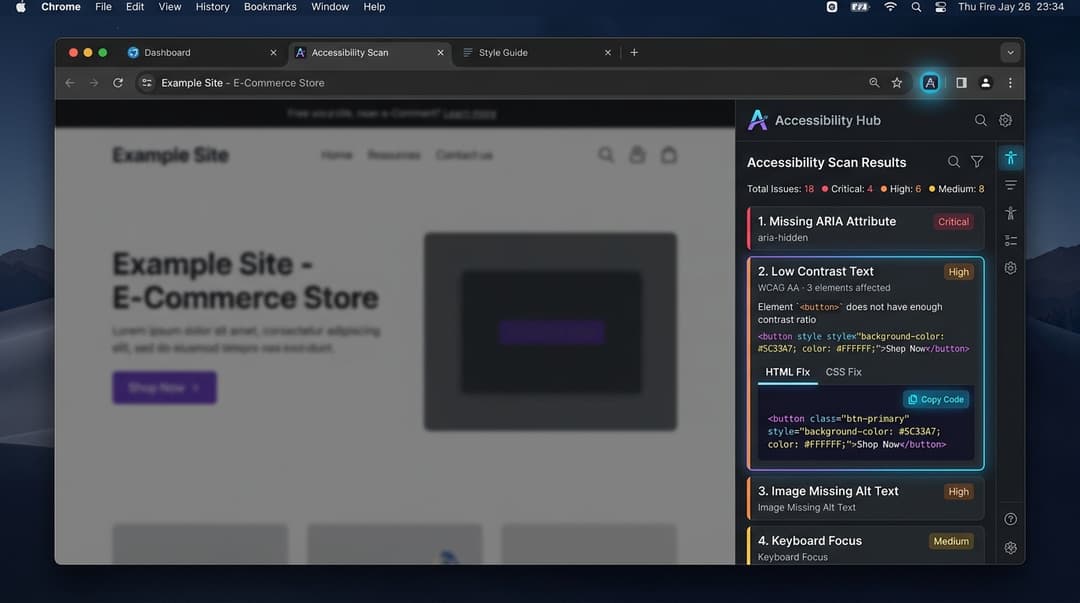
Stop Guessing. Fix Accessibility Visually.
Legacy compliance checkers return long reports of nested HTML elements. A11yEngine behaves like a visual developer tool, computing real-time scores and mapping issues directly onto your active browser screen.
🎯 Visual Boundary Boxes
Highlights errors directly in your browser layout with color-coded severity boxes.
📈 Revenue-Path Highlighting
Prioritizes transactional pages (checkouts, forms) to fix high-risk errors first.
📂 Multi-Format Report Exporting
Generate self-contained, beautifully styled HTML audit reports for client delivery, or instantly copy structured Markdown summaries directly into your engineering tickets.
Extension Audit Scorecard
When activated on any viewport, the A11yEngine browser extension computes an instant accessibility index across 5 core compliance pillars:
How A11yEngine Operates
Eliminate manual compliance auditing and integrate real-time accessibility directly into your daily development routine.
Add to Browser
Install the extension on Chrome, Edge, Arc, or Brave in under 30 seconds with zero setup required.
Inspect Viewport
Open any local or production web page. The overlay engine scans DOM elements and maps issues in-context.
Copy 1-Click Patch
Review visual boundary highlights and copy framework-native code snippets (React, Vue, Tailwind) to fix errors.
Experience A11yEngine Now
Click below to run a mock scan on our sandbox interface and see how overlays, error tags, and sidepanel fixes operate together.
Simulator idle. Activate run accessibility scan to begin.
Standard Landing Section
Launch Premium Subscriptions
Detected Bad Code
<img src="/pricing-premium.jpg" />
Missing alt text
Extension closed
Click "Run Accessibility Scan" in the viewport to open the side panel and inspect errors.
Supported Browsers & Ecosystems
Seamlessly integrates into your active development workflow without changing your stack or build setup.
1. Supported Browsers
2. Code Fix Frameworks
Built for Global Privacy & Regulatory Standards
100% Local DOM Processing
All accessibility evaluations take place locally in your browser memory. Source code never leaves your workstation.
Automatic PII Redaction
Form inputs, password fields, credit card numbers, and user records are sanitized before rule verification.
GDPR / CCPA Zero-Tracking
No commercial profiling pixels, session recordings, or third-party cookies. Fully compliant with EU, UK, and US privacy laws.
Calculate Time & Cost Savings
Discover the engineering hours saved and legal risk minimized by catching accessibility issues early in local browser sessions.
* Calculated using A11yEngine's developer telemetry: averaging 20 minutes saved per automated code remediation across WCAG 2.1 AA violations.
Everything You Need to Know
Got questions about our browser companion, local privacy compliance, or framework compatibility?
The extension injects a lightweight, on-demand observer script into your browser viewport. It evaluates DOM elements section-by-section against WCAG 2.2 AA standards, drawing color-coded visual boundary boxes around accessibility violations in real time.
Ready to Audit Your Website in Seconds?
A11yEngine is now publicly available on the Google Chrome Web Store. Install it free in one click and start remediating accessibility issues directly in your browser.